giovedì 25 ottobre 2012
venerdì 5 ottobre 2012

mercoledì 5 settembre 2012
A Simple viewer in pyOpenGL
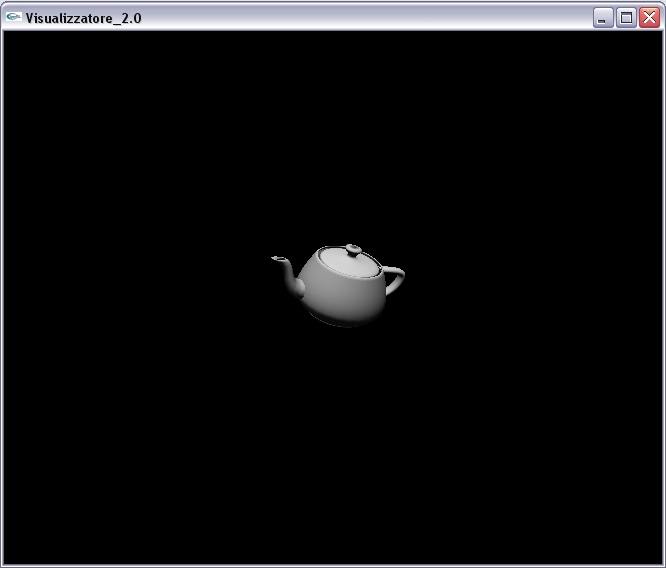

... or copy-paste the following code.
from OpenGL.GL import *
from OpenGL.GLU import *
from OpenGL.GLUT import *


#-----------
# VARIABLES
#-----------

g_fViewDistance = 9.
g_Width = 600
g_Height = 600

g_nearPlane = 1.
g_farPlane = 1000.

action = ""
xStart = yStart = 0.
zoom = 65.

xRotate = 0.
yRotate = 0.
zRotate = 0.

xTrans = 0.
yTrans = 0.


#-------------------
# SCENE CONSTRUCTOR
#-------------------

def scenemodel():
    glRotate(90,0.,0.,1.)
    glutSolidTeapot(1.)


#--------
# VIEWER
#--------

def printHelp():
    print """\n\n
         -------------------------------------------------------------------\n
         Left Mousebutton       - move eye position (+ Shift for third axis)\n
         Middle Mousebutton     - translate the scene\n
         Right Mousebutton      - move up / down to zoom in / out\n
          Key                - reset viewpoint\n
          Key                - exit the program\n
         -------------------------------------------------------------------\n
         \n"""


def init():
    glEnable(GL_NORMALIZE)
    glLightfv(GL_LIGHT0,GL_POSITION,[ .0, 10.0, 10., 0. ] )
    glLightfv(GL_LIGHT0,GL_AMBIENT,[ .0, .0, .0, 1.0 ]);
    glLightfv(GL_LIGHT0,GL_DIFFUSE,[ 1.0, 1.0, 1.0, 1.0 ]);
    glLightfv(GL_LIGHT0,GL_SPECULAR,[ 1.0, 1.0, 1.0, 1.0 ]);
    glEnable(GL_LIGHT0)
    glEnable(GL_LIGHTING)
    glEnable(GL_DEPTH_TEST)
    glDepthFunc(GL_LESS)
    glShadeModel(GL_SMOOTH)
    resetView()


def resetView():
    global zoom, xRotate, yRotate, zRotate, xTrans, yTrans
    zoom = 65.
    xRotate = 0.
    yRotate = 0.
    zRotate = 0.
    xTrans = 0.
    yTrans = 0.
    glutPostRedisplay()


def display():
    # Clear frame buffer and depth buffer
    glClear(GL_COLOR_BUFFER_BIT | GL_DEPTH_BUFFER_BIT)
    # Set up viewing transformation, looking down -Z axis
    glLoadIdentity()
    gluLookAt(0, 0, -g_fViewDistance, 0, 0, 0, -.1, 0, 0)   #-.1,0,0
    # Set perspective (also zoom)
    glMatrixMode(GL_PROJECTION)
    glLoadIdentity()
    gluPerspective(zoom, float(g_Width)/float(g_Height), g_nearPlane, g_farPlane)
    glMatrixMode(GL_MODELVIEW)
    # Render the scene
    polarView()
    scenemodel()
    # Make sure changes appear onscreen
    glutSwapBuffers()


def reshape(width, height):
    global g_Width, g_Height
    g_Width = width
    g_Height = height
    glViewport(0, 0, g_Width, g_Height)


def polarView():
    glTranslatef( yTrans/100., 0.0, 0.0 )
    glTranslatef(  0.0, -xTrans/100., 0.0)
    glRotatef( -zRotate, 0.0, 0.0, 1.0)
    glRotatef( -xRotate, 1.0, 0.0, 0.0)
    glRotatef( -yRotate, .0, 1.0, 0.0)


def keyboard(key, x, y):
    global zTr, yTr, xTr
    if(key=='r'): resetView()
    if(key=='q'): exit(0)
    glutPostRedisplay()


def mouse(button, state, x, y):
    global action, xStart, yStart
    if (button==GLUT_LEFT_BUTTON):
        if (glutGetModifiers() == GLUT_ACTIVE_SHIFT):
            action = "MOVE_EYE_2"
        else:
            action = "MOVE_EYE"
    elif (button==GLUT_MIDDLE_BUTTON):
        action = "TRANS"
    elif (button==GLUT_RIGHT_BUTTON):
        action = "ZOOM"
    xStart = x
    yStart = y


def motion(x, y):
    global zoom, xStart, yStart, xRotate, yRotate, zRotate, xTrans, yTrans
    if (action=="MOVE_EYE"):
        xRotate += x - xStart
        yRotate -= y - yStart
    elif (action=="MOVE_EYE_2"):
        zRotate += y - yStart
    elif (action=="TRANS"):
        xTrans += x - xStart
        yTrans += y - yStart
    elif (action=="ZOOM"):
        zoom -= y - yStart
        if zoom > 150.:
            zoom = 150.
        elif zoom < 1.1:
            zoom = 1.1
    else:
        print("unknown action\n", action)
    xStart = x
    yStart = y
    glutPostRedisplay()


#------
# MAIN
#------
if __name__=="__main__":
    # GLUT Window Initialization
    glutInit()
    glutInitDisplayMode (GLUT_DOUBLE | GLUT_RGB| GLUT_DEPTH)      # zBuffer
    glutInitWindowSize (g_Width,g_Height)
    glutInitWindowPosition (0 + 4, g_Height / 4)
    glutCreateWindow ("Visualizzatore_2.0")
    # Initialize OpenGL graphics state
    init ()
    # Register callbacks
    glutReshapeFunc(reshape)
    glutDisplayFunc(display)
    glutMouseFunc(mouse)
    glutMotionFunc(motion)
    glutKeyboardFunc(keyboard)
    printHelp()
    # Turn the flow of control over to GLUT
    glutMainLoop()
Useful Tips for Blogger Dynamic View
You can add following CSS attributes in
model >> personalize >> advanced >> add CSS
Tips
#gadget-dock { right: 0; } /* undock widget left side bar*/

.gadget-icons { background-color: red; } /* change background widget color */
/* change back color of flipcards in Flipcard view */ .flipcard .back { background: white !important; }.flipcard .back .overlay .title { color: black !important; } .flipcard .back .overlay .date { color: red !important; } /* to change the font colour for the profile text on the gadgets */ profile-aboutme { color: white !important; } /* set the location of the profile text */ .profile-location { color: white !important; } /* center blog title */ .tabs { width: 100% !important; /* if you have problems with links, set it to 85% */ text-align: center !important; } /* set semi-transparent post background */ .sidebar .item { background: #E4E4E4 !important; } #items.items li.item, .overview-inner, .magazine #content, .ss .item, .mosaic #content .item, .sidebar #content, #sidebar .item.selected, .timeslide .item, .viewitem-content { background: url('image.png') !important; } .overview-panel .article, .magazine #feature, .viewitem-panel .article, .sidebar #content .article { background: transparent !important; } #overview .overview-backdrop{ opacity: 0 !important; }
domenica 26 agosto 2012
A simple Java prettyPrint() method for JSON
Download JAR file : link ( It required to import JSONSimple library )
domenica 22 luglio 2012
How To implement indexes in Redis using Jedis driver

"Redis is an open source, advanced key-value store. It is often referred to as a data structure server since keys can contain strings, hashes, lists, sets and sorted sets.
You can run atomic operations on these types, like appending to a string; incrementing the value in a hash; pushing to a list; computing set intersection, union and difference; or getting the member with highest ranking in a sorted set.In order to achieve its outstanding performance, Redis works with an in-memory dataset. Depending on your use case, you can persist it either by dumping the dataset to disk every once in a while, or by appending each command to a log." [link]
Redis is simple to use and has powerful low level API, through which developers can implement complex tasks.
It is a key-value store: to search for something we must know the corresponding entry key.
However, sometimes is needed to retrive entries by value, for example when we want a subset of HASHES (representing POJOs) having the same value in a specific field. In those cases there is not a single command to do that, so a workaround is required.
My solution is to implement a sort of "index" of the field of interest, using SORTED SET type offered by Redis.
"Redis Sorted Sets are, similarly to Redis Sets, non repeating collections of Strings. The difference is that every member of a Sorted Set is associated with score, that is used in order to take the sorted set ordered, from the smallest to the greatest score. While members are unique, scores may be repeated."
In the following Java code, methods take a Jedis instance as parameter, used to communicate with Redis datastore.
An example of pojo class:
public class PojoClass {
 private Long id;
 private int number;
 private String text;
 /* getters and setters omitted */
}
Utility class contains methods to make id and pojoName from a pojo instance; a pojoId identify an unique istance of a pojo class in the datastore.
public class Utility {

 public static String getPojoName( Object pojo ) {
  return pojo.getClass().getName();
 }

 public static String getId( Object pojo ) {
  try { return ""+pojo.getClass().getField("id").get(pojo); }
  catch (Exception ignored) { }
  return null;
 }

 public static String getPojoId( Object pojo ) {
  return getPojoName(pojo)+"_"+getId(pojo);
 }

}
IndexManager methods:
- calculateScore(Object value)
- persistEntry(Object pojoInstance, String fieldName, Object fieldValue, Jedis jedis)
- findEntries(String pojoName, String fieldName, Object fieldValue, Jedis jedis)
- removeEntry(String remPojoId, String fieldName, Jedis jedis)
calculateScore() calculates corrispective double value of a primitive Java type value; if input parameter is an instance of String, return its hashcode (NB: it may not be unique).
public static double calculateScore(Object value) {
  Class<?> valueClass = value.getClass();
  Double score = 0.0;
  if ( valueClass.equals(Short.class)    ||
    valueClass.equals(Integer.class) ||
    valueClass.equals(Long.class)   ||
    valueClass.equals(Float.class)   ||
    valueClass.equals(Double.class)  ){
   score = Double.parseDouble(""+value);
  } else
  if ( valueClass.equals(Character.class)  ){
   score = ((Integer)value).doubleValue() ;
  } else
  if ( valueClass.equals(Boolean.class) ){
   score = ((Boolean)value)? 1.0 : 0.0;
  } else
  if ( valueClass.equals(Byte.class) ){
   score = ((Byte)value).doubleValue();
  }
  if ( valueClass.equals(String.class) ){
   score = Double.parseDouble(""+((String)value).hashCode());
  }
  return score;
 }
Command ZADD must be used to insert "index" entries in the datastore:
findEntries() is useful to retrive entries with a specific field value:public void persistEntry(String pojoName, String fieldName, Object fieldValue, Jedis jedis) { if (!value.getClass().equals(String.class)) { // if String.class : value must be persisted in index entry jedis.zadd(pojoName+":"+fieldName, this.calculateScore(fieldValue), value); } else { jedis.zadd(pojoName+":"+fieldName, this.calculateScore(fieldValue), ""); } }
public Set<String> findEntries(String pojoName, String fieldName, Object fieldValue, Jedis jedis) {
  String key = pojoName+":"+fieldName;
  double minmaxScore = this.calculateScore(fieldValue);
  Set<String >keys = new HashSet<String>();
    if (fieldValue instanceof String) {
      Set<String> keys_tmp = jedis.zrangeByScore(key, minmaxScore, minmaxScore);
      for (String k : keys_tmp) {
        String[] valueAndReferredEntity = k.split("\\$\\$\\$");
        if (valueAndReferredEntity[0].equals(""+fieldValue)) {
          keys.add(valueAndReferredEntity[1]);
        }
      }
    } else {
      keys = jedis.zrangeByScore(key, minmaxScore, minmaxScore);
    }
    return keys;
}
When an istance of a PojoClass is removed from the DB, its indexes must be updated:
public void removeEntry(String remId, String remPojoName,
     String fieldName, Object fieldValue, Jedis jedis) {
  Set<String> keys = null;
  String key = remPojoName+":"+fieldName;
  double minmaxScore = Utility.calculateScore(fieldValue);
  keys = new HashSet<String>();
  if (fieldValue instanceof String) {
    keys = jedis.zrangeByScore(key, minmaxScore, minmaxScore);
    for (String k : keys) {
    String[] valueAndReferredEntity = k.split("\\$\\$\\$");
      if (valueAndReferredEntity[0].equals(""+fieldValue)) {
        jedis.zrem(key, k);
      }
    }
  } else {
    keys = jedis.zrangeByScore(key, minmaxScore, minmaxScore);
    for (String k : keys) {
      if (k.equals(""+remId)) { jedis.zrem(key, k); }
    }
  }
}
NB: Indexes should also be updated when indexed field values of a PojoInstance changes.
Iscriviti a:
Post (Atom)